We Repair All Type Brand Oppo, Vivo, MI, Samsung

Gtech Mobile Repairig Nagra Road bilaunjha Mau, Click This Link And View My All Repairing Videos

All Type Mobile Software Service Available

All types of mobile software is done online or offline. Contact for online service.

Mobile Repairing Hardware Solution

We Provide All Type Mobile Hardware Repairing Solution in Image like Jumper Pic

Gtech Mobile Repairing YT Channel

Here We Post All Type Brand Repairng Videos.Tab This Link And See My all Videos,And Do't Forgate Like, Subcribe

Leptop,Desktop Software solution

All type Windows And driver Available.

Showing posts with label Volte. Show all posts

ENABLE VOLTE OPTION IN SAMSUNG GALAXY J7 PRIME


Enable VoLTE option in Samsung Galaxy J7 prime

#it method work in all samsung phone

Method 1:

Step 1: Open dialer app
Step 2: Click settings (three Dots)
Step 3: Scroll down and navigate to USE VoLTE option
Step 4: Enable the radio button on your device.
This is the simplest way to enable VoLTE on your phone from the Call settings menu.


Method 2

this method is the universal method on all android phones, whoever the manufacturer this option will work for you.
Step 1: Open dialer app
Step 2: Dial *#*#4636#*#*
Step 3: Choose phone Information
Step 4: Select VoLTE provisioned flag
That’s it, now restart your phone
Step 5: Go to settings menu >More >Cellular networks and enable ENHANCED 4G LTE mode.


Suggested Read
                                          ·         How  Root Any Samsung Mobile Phone...
            ·         ROOT SAMSUNG MOBILE BY CF AUTO ROOT ....

Method 3 -

Switch 4G
1.       From the Home screen, tap Apps > Settings.
2.      Tap Mobile networks.
3.      Tap Network mode.
4.      Tap lte of the following desired band settings:
·         LTE/3G/2G (auto connect)
·         3G/2G (auto connect)
·         3G ONLY
  • 2G ONLY


Fix any Samsung 4G mobile LTE TO VOLTE


Fix any Samsung mobile LTE TO VOLTE in few Second
You want to make any Samsung 4G mobile phone LTE to VOLTE .then follow this step 100% tested by gtech mobile repairing Nagra road Bilaunjha Mau
Step1 go to developer option and enable OEM unlock and debugging mode (If you are not getting the developer option, hit the build number 7 times)
Step2 Root your Samsung mobile Phone


Suggested Read:
                                    ·         How  Root Any Samsung Mobile Phone...
                  ·         ROOT SAMSUNG MOBILE BY CF AUTO ROOT ....


Step3 After the mobile is root, copy these two files (volte fix and root explore.apk) into your phone.
CLICK HERE TO DOWNLOAD FILE
                                                     · Root explore
                                                     · Volte fix file
Step4 install root explore .apk


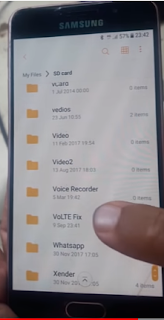
Step5 Extracted volte file after being installed and you get a folder


Step 6  open root explore apk  allow root explore and give root permission click grant


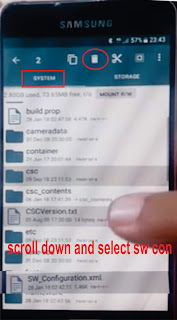
Step7  And if you scroll down, you will get a system name folder.  After open the system file, you have to delete the csc, cscversion.txt and  sw configuration file.


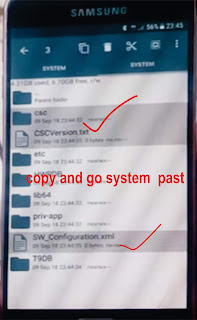
Step8  Go to stroge and open the volte fix file and copy the delete file (csc csc version .text and sw configuration) After copying, go to the system and past it.

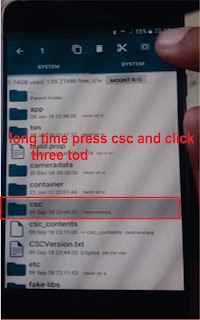
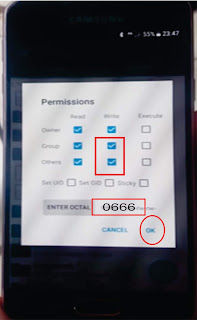
Step9 Now these files have to give you permission After pressing csc for a long time, click on three dot. And when a new screen is open,  click permission untick the two box.


click ok


Step10 After giving permission to csc. In the same folder below, pressing csc content and csc version text file and give permission


click three dot and select permission Now untick the two boxes and select the enter octal 0666 > click ok


Restart your phone and after some time come LTE VOLTE